The first accounting task an AI tool completes well can create a dangerous amount of confidence.
It matches several transactions correctly. It produces a tidy summary. It drafts a customer reminder in seconds. The team starts to assume the next answer will be right too.
That is the moment control matters most.
MYOB's June 2026 article for accountants uses a helpful phrase: automate the grind, not the judgement. Its current AI information also tells customers to verify AI-generated suggestions before using them for business, financial, tax or employment decisions. The Asian Development Bank's July 2026 outlook makes the wider regional point: skills, digital infrastructure, innovation capacity and data governance shape whether developing economies can turn AI into useful productivity.
For a Fiji business, this does not mean every advertised AI feature is available in every MYOB product, plan or country. Some features are beta, and AI BAS is described by MYOB as an Australian product. It also does not mean AI adoption rates reported overseas apply to Fiji.
It does mean businesses need a practical rulebook before automation spreads quietly through the back office.
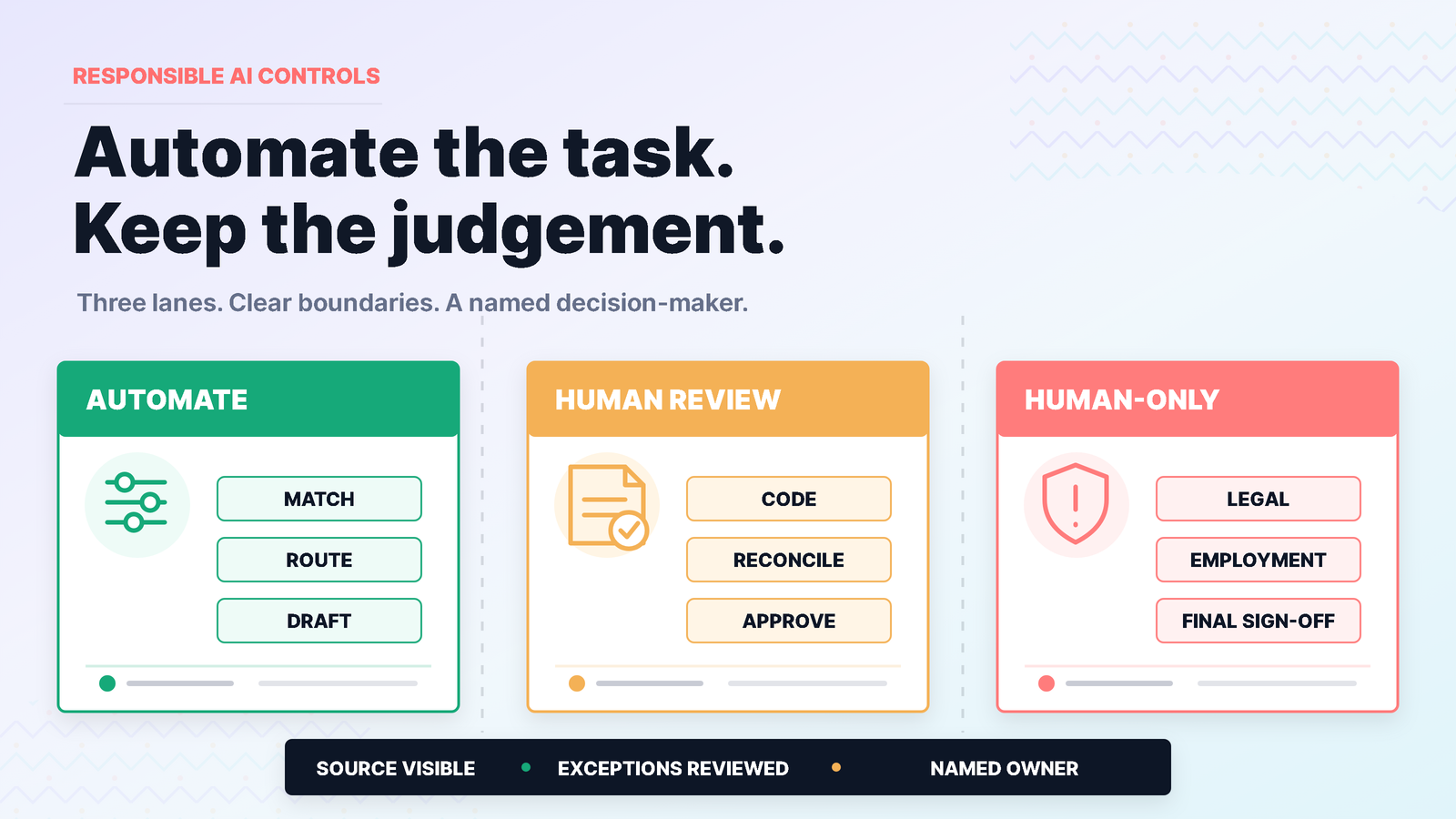
Divide the work into three lanes
Start with the task, not the tool.
Lane 1: automate with routine review
These are frequent, reversible tasks where the source data is clear and errors are likely to be caught quickly. Examples may include:
- suggesting a transaction category;
- finding a likely match;
- identifying duplicate or missing information;
- drafting an invoice reminder;
- formatting a management summary; and
- routing a support request.
Automation can reduce effort, but someone still checks exceptions and reconciles the final result.
Lane 2: AI assists, a person approves
These tasks affect accounting treatment, cash, employees, tax or customer commitments. Examples include:
- changing an account or tax code;
- approving a supplier payment;
- finalising a bank reconciliation;
- adjusting inventory value;
- changing payroll data;
- interpreting a margin or cash-flow trend; and
- sending a sensitive customer communication.
AI may prepare or suggest. An authorised person decides.
Lane 3: human-only decision
Keep legal conclusions, professional tax advice, employment decisions, fraud allegations, access approvals and final statutory sign-off with accountable people. An AI-generated explanation may help someone prepare questions, but it should not become the authority.
The lanes will differ by business. Write them down so staff do not invent the boundary one prompt at a time.
Control 1: begin with clean, current data
AI can spot patterns in the data it receives. It cannot repair every flaw in the underlying workflow.
If supplier names are duplicated, bank feeds are months behind, tax codes are inconsistent or inventory transactions are missing, an intelligent suggestion can still be based on a poor record.
Before automating a workflow, check:
- opening balances and key reconciliations;
- duplicate customers, suppliers and items;
- account and tax-code setup;
- outstanding bank transactions;
- user access;
- integration failures; and
- the date of the latest complete data.
Treat data quality as the first AI control, not a separate clean-up project.
Control 2: give the tool and the user only the access they need
An employee should not gain wider access simply because a tool makes a task faster.
Map the permissions behind the workflow. Who can see payroll? Who can change bank details? Who can approve a payment? Who can export customer information? Which third-party tool receives the data, and under what terms?
Do not paste customer, employee, bank or commercially sensitive information into a public AI service unless the business has reviewed the privacy, security and contractual implications and authorised that use.
Use named accounts, multi-factor authentication where available and a joiner-mover-leaver process. If an employee changes role, the old access should not remain by default.
Control 3: make the source visible to the reviewer
A reviewer needs more than a confident answer. They need the transaction, document or data that supports it.
For an AI-assisted accounting result, the review screen or workpaper should show:
- the original bank line, invoice, bill or record;
- the suggestion made;
- why the suggestion may be plausible;
- any confidence or exception indicator the product provides;
- the person who accepted or changed it; and
- the date of the decision.
MYOB's public AI material emphasises context, data sources and customer control. Use those features where they are available, but do not assume a high-confidence label removes the need for reconciliation.
Control 4: review exceptions, not just averages
An automation can perform well overall and still fail on the transaction that matters.
Build an exception queue for:
- unfamiliar suppliers or customers;
- new bank accounts;
- unusual amounts;
- transactions near approval limits;
- manual overrides;
- tax-code changes;
- negative stock or margin;
- payroll changes; and
- suggestions that conflict with a rule or source document.
Review a sample of apparently successful results too. If the team checks only items the AI labels uncertain, a systematic high-confidence error can continue unnoticed.
Control 5: keep a person accountable for the final result
"The system did it" is not an approval.
Name the person responsible for each AI-assisted workflow and define the point at which the result becomes official. For example:
- the bookkeeper reviews suggestions;
- the finance manager approves unusual coding;
- the payroll officer checks the pay run;
- the owner authorises the payment batch; and
- the accountant or adviser handles professional conclusions.
Where possible, retain an audit trail of approvals and overrides. Repeated overrides are useful information: the model, rule, training data or process may need attention.
Train staff to challenge a plausible answer
AI mistakes are not always obvious. A result can be neat, specific and wrong.
Give users a short verification habit:
- identify the source;
- check the period, entity and currency;
- compare the result with the document or ledger;
- consider what may be missing;
- ask whether the user is authorised to decide; and
- escalate tax, employment, legal or high-value uncertainty.
Training should also show staff how to report a bad suggestion, reverse an incorrect match and recover the workflow without creating duplicate entries.
Run a small pilot before switching on more
Choose one narrow, high-volume task. Bank transaction suggestions or draft invoice reminders may be easier to contain than payroll or inventory valuation.
For four weeks, track:
- number of suggestions;
- number accepted without change;
- number corrected;
- time saved;
- exceptions missed;
- support required; and
- whether the month-end reconciliation improved.
Decide in advance what would make the pilot pause. A security concern, repeated miscoding or unclear ownership should trigger review, not a race to retrain staff around the problem.
Ask these questions before adopting an AI feature
- Is this feature available in our product, plan and region?
- Is it live, beta or on a roadmap?
- What data does it use?
- Can users see why a suggestion was made?
- Can the suggestion be changed or reversed?
- What permissions apply?
- What is logged?
- Who provides support?
- Which person approves the final result?
- How will we know whether it is actually improving the workflow?
These questions turn an AI discussion into an operational decision.
Useful automation should make control easier to see
The goal is not to keep people clicking through work a system can handle safely. It is also not to remove people from decisions that require context, authority and judgement.
Well-designed automation reduces repetition, surfaces exceptions and leaves a clear path back to the source. It gives the reviewer more time for the work only a person can do.
TAS helps Fiji businesses review accounting-connected workflows, MYOB setup, permissions, reporting, training and support. Feature availability and suitability must be checked against the business's actual product, plan, region and process.
Sources
- MYOB, From stretched to scalable: Leveraging AI to manage your clients at scale, updated 29 June 2026.
- MYOB, AI accounting software, accessed 22 July 2026.
- MYOB, Matching transactions with automatches and suggestions, accessed 22 July 2026.
- Asian Development Bank, Economic Forecasts for Asia and the Pacific: July 2026, July 2026.